How to Study Lecture Slides for Exams: Active Recall, Spaced Review and a Plan for Finals Week
How to study for exams from lecture slides and class handouts, using what learning research says works — testing yourself instead of rereading, spreading reviews out, and practising with past papers. A step-by-step method, a plan for the last week, what to do with no past exams or only one night left, and the tools that help.
The most effective way to study lecture slides is to stop rereading them and start testing yourself on them. Turn each slide into a question, cover the answer, try to recall it, then check, and do that over several days rather than in one long session. In the best-known review of study techniques, testing yourself and spacing your study out are the only two rated as highly useful; rereading and highlighting, the two things most students do with slides, come out near the bottom. This guide shows how to apply that to the slides and handouts you already have, with a plan for the last week before an exam and what to do when there are no past papers or only one night left.
Why rereading slides feels productive, and isn't
Rereading makes slides feel familiar, and familiarity feels like knowing. But an exam asks you to produce an answer, not to recognise a page you have seen.
- In 2013, John Dunlosky, a psychologist at Kent State University who studies how students learn, and four colleagues reviewed the evidence on ten common study techniques. They rated practice testing and distributed practice, meaning spreading study over time, as high utility. Rereading, highlighting and summarising were rated low utility.
- In a well-known experiment, the memory researchers Henry Roediger and Jeffrey Karpicke had students learn short texts either by rereading them or by recalling them in a test. Five minutes later the rereaders did slightly better; a week later the students who had tested themselves remembered more, although the rereaders had predicted they would do better.
Highlighting is not useless. It is how you mark what to test yourself on. On its own, it only colours the page.
Step by step: turn your slides into a test
- Put each course's material in one place. Slides from the course page, handouts sent by e-mail or in a group chat, and paper printouts, scanned. One folder per course, so nothing is missing the week before the exam.
- Skim the whole deck first. Read only the titles and headings of every slide, in order. They are the outline of what the lecturer thinks matters, and usually the outline of the exam. Note what was repeated, flagged as important, or given a lot of time.
- Turn headings into questions. "Causes of the First World War" becomes "What were the causes of the First World War?" A diagram becomes "Draw and label this from memory." A term in bold becomes "Define it."
- Hide the answer and recall it. Cover the body of the slide, with a sheet of paper, a flashcard or a red sheet over words you highlighted in red, and say or write the answer before you look. For a whole topic, write everything you remember on a blank page, then compare.
- Check and mark. Compare with the slide, and mark what you got and what you missed. What you missed is tomorrow's work.
- Come back to what you missed a day or two later, and again closer to the exam. A gap before each new attempt is what makes the memory last.
A plan for the last week
If you have followed the course, a week per exam is a reasonable minimum. Starting earlier with less each day beats the same number of hours crammed into the last two days.
| When | What to do |
|---|---|
| 7 days before | Gather every slide and handout. Skim each deck and write the list of questions |
| 6 and 5 days before | Test yourself on every topic once. Mark what you missed |
| 4 and 3 days before | Retest only what you missed. Do past papers against the clock if you have them |
| 2 days before | Mix questions from different lectures, so you have to recognise which topic each belongs to |
| The day before | A short last test of what you still miss. Nothing new. Sleep |
| The morning of the exam | Read through the short list of things you keep forgetting |
No past papers? Make your own questions
- Use the learning objectives. The objectives at the start of a lecture are exam questions in another form.
- Turn the slide's language into question types. Every term in bold becomes "define", every comparison slide "what is the difference between", every process "describe the steps of".
- Ask why and how. For each key claim, ask why it is true and how it connects to the last lecture. Dunlosky's review rated this kind of questioning moderately useful.
- Ask what format the exam takes. Multiple choice, short answers and essays need different practice. Practise in the format you will sit.
If you do have past papers, use them for two things: list which sections came up, how often and in what form, and sit at least one under exam conditions, against the clock with the answers covered.
If you only have one night
- Do not reread everything. Pick the topics that look most likely: emphasised in the slides, repeated, or on past papers.
- Test yourself on those, even briefly. Recalling an answer still does more than reading it again.
- Sleep for part of the night. Memories are consolidated during sleep, and an all-nighter tends to cost more in the exam than the extra hours give back.
- Plan to come back to it. Cramming can get you through tomorrow; if the next course builds on this one, the material will need another round.
Tools that help
- Paper and a cover sheet. Free, and it works with printed slides.
- Flashcard apps such as Anki, a free, open-source flashcard program that schedules reviews for you (free on computers, Android and the web; $24.99 on iPhone and iPad), or Quizlet (free to start, with a paid plan). Good for terms and definitions, but you have to retype the material into cards.
- A red sheet over your own slides. Japanese students have long written key words in red or orange, laid a transparent red sheet over the page and watched the words disappear. An app can do the same with the words you highlight on a PDF, without retyping anything.
Studying slides with Rectoly: Handouts & Papers
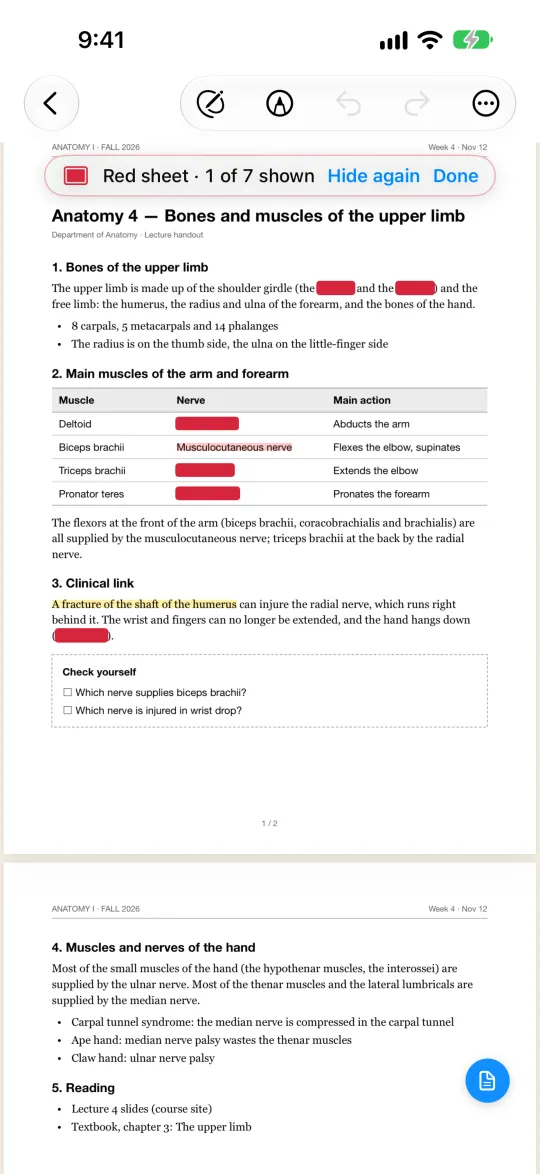
Rectoly: Handouts & Papers is a PDF reader for students built around this way of studying. In version 3.0 (November 2026) on iPhone, iPad and Mac:
- A folder for each class. Slides and handouts come in from the Files app, a chat app or e-mail; PowerPoint slides (.pptx) and Word documents (.docx) are turned into PDFs on your device, and Scan Document turns a paper printout into a searchable PDF. Search This Folder looks through a course's materials, scanned text and your notes at once.
- A red sheet. Highlight what you need to learn in red, hide it, and reveal it one tap at a time. Mark each word Got it or Not yet, and Due today shows only the words you missed or that are due again. Give a folder its exam date and the reviews close in on that day, with reminders a week, three days and one day before.
- Past papers against your slides. Put past exam papers in the folder with the class materials, and the app counts which sections were asked in how many exams, and in what form (for materials in English or Japanese). Take as an Exam times you and covers the answers.
- Class recordings tied to pages. The pages you turn while recording are linked to the moment, so you can replay what was said about a slide from that slide. Follow your university's rules on recording.
Opening and reading your own PDFs, reviewing with the red sheet, searching a folder, bringing in slides and documents, and syncing through iCloud are free. Writing, Reading Mode, translation and class recording come with a 14-day free trial, then a one-time purchase of $9.99, with no subscription, no ads and no account. The Android version has the folders, scanning and the red sheet too.
Frequently asked questions
How do I study lecture slides effectively?
Turn each slide's heading into a question, cover the answer, recall it, then check. Mark what you missed and come back to it a day or two later. Testing yourself and spreading your reviews out work better than rereading or highlighting the slides again.
How many days before an exam should I start studying?
About a week per exam is a reasonable minimum if you have kept up with the course, and earlier for heavy courses. Shorter sessions spread over more days beat the same hours squeezed into the last two.
Is highlighting lecture slides a waste of time?
On its own it does little: a review of study techniques rated it low utility. It becomes useful when you use what you highlighted as the questions you test yourself on, for example by hiding it under a red sheet.
How do I study when there are no past exams?
Make your own questions from the learning objectives, the bold terms and the comparison slides, ask why and how of each key claim, and ask the lecturer what format the exam takes so you can practise in it.
Does studying the night before an exam work?
It can get you through the next day, but it is the least effective way to learn. If you only have one night, test yourself on the most likely topics instead of rereading, and sleep for part of the night.
What is active recall?
Active recall means retrieving an answer from memory, by answering a question, filling a blank or writing down what you remember, instead of reading the material again. It is the practice testing that learning research rates among the most useful study techniques.
What is the red sheet method?
A way of testing yourself that Japanese students use: key words are written or highlighted in red or orange, and a transparent red sheet laid over the page hides them until you lift it. Apps do the same on a screen, with the words you highlight in red.