How to Read Mendeley Papers on Android in 2026
There is no official Mendeley app for Android, and there has not been one since March 2021. Here are the ways to read your Mendeley library on an Android phone, tablet or E Ink device in 2026, what each one is good at, and what happens to your notes.
A lot of researchers keep their library in Mendeley, and a lot of them carry an Android phone or tablet rather than an iPad. Getting the one onto the other is less obvious than it should be, because there is no official Mendeley app for Android, and there has not been one for more than five years.
This article covers what happened, what the options are in 2026, and what each one is good at. It is not an argument for leaving Mendeley. Your library can stay exactly where it is; the question is only how the reading part of the day gets easier on the device in your bag.
What happened to Mendeley on Android?
Mendeley did have an Android app. Elsevier launched it in June 2015 with reading, annotation, offline access and sync, and it was retired on March 15, 2021, the same day as the iOS app. It was removed from Google Play, sign-in was switched off, and users were asked to sync their library to the cloud beforehand and to use Mendeley Reference Manager, on the desktop or in a browser, from then on. The announcement is still on the Mendeley blog, and nothing has replaced the app since. The fuller story is in What Happened to the Mendeley Mobile App?.
So an Android device can reach your library, through Chrome, like any other website. What went away is the step after that: a reader on the device that knows your library, keeps your papers offline, and puts your notes back where they belong.
The options available in 2026
| Option | What it gives you | Main limitation |
|---|---|---|
| Mendeley on the web | Your library in any browser, nothing to install | The reading experience, and no offline |
| Downloading PDFs to another app | Any Android PDF reader you like | Manual file management, notes outside the library |
| Rectoly for Mendeley | A reader connected to your library, built for phones, tablets and E Ink | A paid app after the 14-day trial |
Chrome / the web
Open Mendeley Reference Manager in the browser and read the PDF there. It is the shortest path to a paper you want to check rather than study, and there is nothing to install.
What it does not give you is offline reading, a place for a stylus, or a reader that remembers where you were. Reference Manager on the web is built for a desktop browser; on a 6-inch screen a two-column PDF is a lot of pinching.
Downloading PDFs to another app
Download the file from your library and open it in any Android PDF reader. This gives you the best reading and the best pen of the three, and it works with no connection at all.
The cost is bookkeeping. Each paper is a manual download, and the copy you annotate then lives in the reader app, not in Mendeley. Months later, the paper you catalogued and the paper you wrote on are two different files, and the notes are in the one your library does not know about.
Third-party apps
In 2021 the expectation was that a third-party app would fill the gap. On the iPad one did, after a fashion. On Android we could not find a currently maintained app on Google Play that signs in to a Mendeley account. If you find one, look at two things before moving a working routine onto it: when it was last updated, and which annotation types it writes back to Mendeley.
Rectoly for Mendeley
Rectoly for Mendeley is an app that signs in to your Mendeley account, brings your library onto the Android device, and opens each paper in a reader built for reading it. It runs on Android phones, tablets and E Ink devices such as Boox, on the same library and the same purchase as Rectoly on iPad, Windows, Mac and Linux. What it does is the rest of this article.
Reading: a paper reflowed for the screen you have
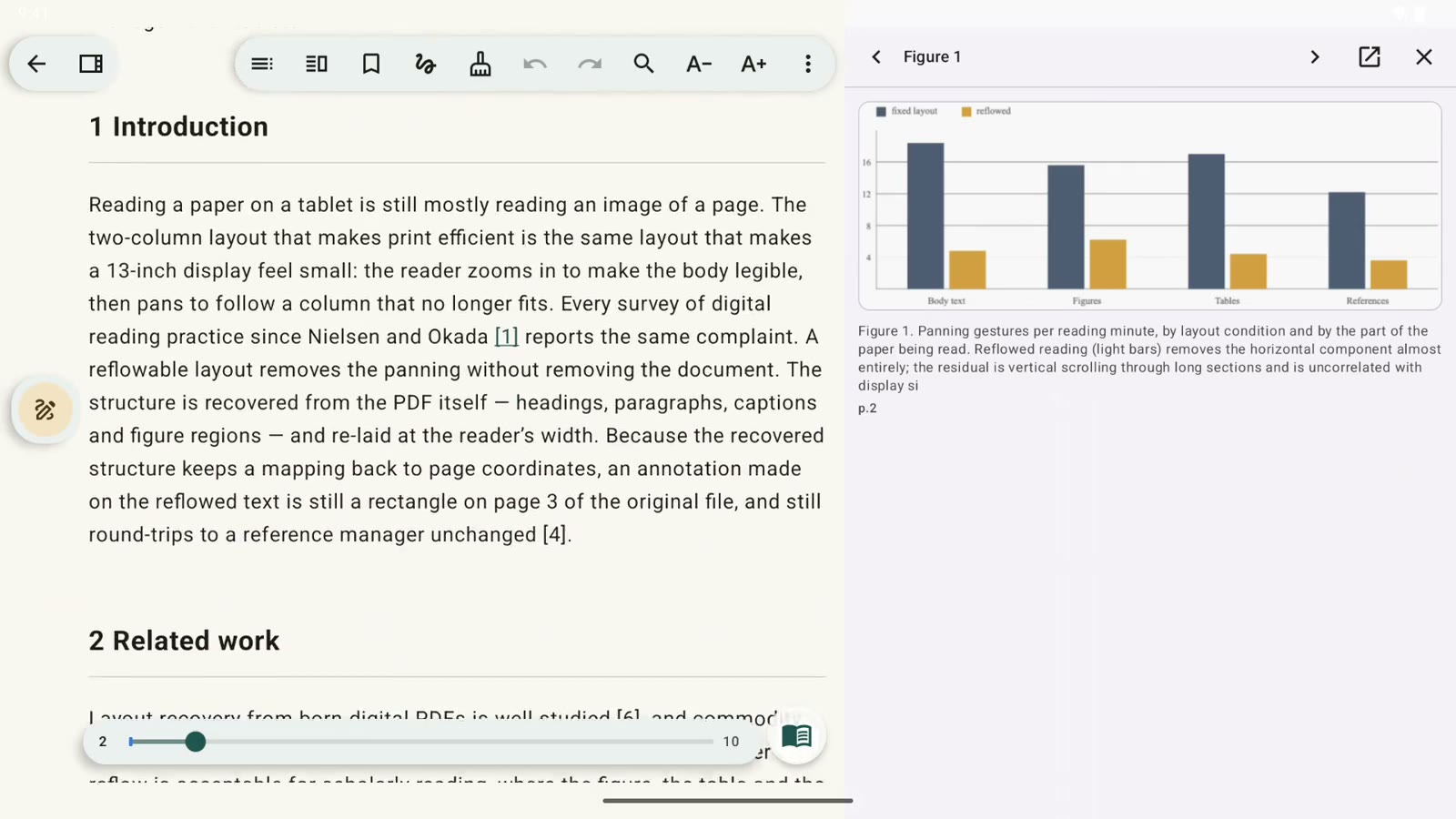
A two-column PDF is laid out for paper. Rectoly reads the paper's structure and reflows it into one column at the width of your screen, headings and paragraphs and captions in order, figures and tables as cards in the flow. Pin a figure and it stays beside the text while you read on; tap a numbered citation like [12] and the reference it points to appears without leaving the page. The original PDF page can sit beside the reflowed text, and a second paper can be opened beside the first.
On a phone that turns a paper you would otherwise save for the desk into one you can read on the train. On an E Ink device there is an E Ink optimisation setting for the display.
Annotating: a stylus or a finger, and your notes go home
Highlight, underline, add a sticky note, or write by hand, with a stylus or with a finger, on the reflowed text or on the original page. Highlights, underlines and sticky notes are placed on the PDF at the real position, so they sync to your Mendeley library as ordinary Mendeley annotations, and annotations you made in Mendeley earlier are there when the paper opens on Android. Sync runs when you open a paper, when something changes, and in the background about every six hours; an annotation made offline waits on the device and goes up next time.
Handwriting is the exception, because Mendeley has no ink annotation type. Rectoly keeps it anyway, stored on the Mendeley item as an attached file, and draws it back onto the page on every device you read on. Mendeley itself will show the file, not the strokes. The full picture of what Mendeley can and cannot store is in How to Annotate Mendeley PDFs on iPad; the same rules apply on Android.
A PDF that arrives on the phone can be added to your Mendeley library from the app, so it does not sit in Downloads until you are back at the desktop.
Offline, translation and AI
Papers you have opened or downloaded stay on the device and read with the network off. Download all missing PDFs fetches a whole collection before a trip.
Since the 2.0 release the Android app also translates papers on the device itself, and since 2.1 it can group the notes you wrote across many papers by topic and write each paper up as a card for a literature review table, with every sentence checked against the text. Both run with a model downloaded once to the device, on a phone or tablet with roughly 8 GB of memory or more, and nothing is sent to any server. They are described in Rectoly Translates Papers On Your Own Hardware and Rectoly Organizes Your Notes and Writes Your Literature Review Table.
Getting it, and what it costs
Rectoly for Android is downloaded from rectoly.com/android, not from Google Play, so it works on any Android device with or without Play services. It needs Android 9 or later on a 64-bit device. Installing takes a minute: open the .apk, allow installs from your browser when Android asks, and if Google Play Protect says it blocked an app it has not seen before, choose More details and Install anyway. The app then asks you to sign in on Mendeley's own sign-in page, which opens inside the app; Rectoly never shows a password field of its own. Updates come the same way: the app tells you when there is a new version, and the new .apk installs over the old one with your library and notes intact.
Every feature is free for 14 days. After that it is one purchase, made on rectoly.com from the app's Buy on rectoly.com button, and the same purchase unlocks Rectoly for Mendeley on Android, iPad, iPhone, Windows, Mac and Linux wherever you sign in with the same Mendeley account. A purchase made on any of those unlocks Android too, and a purchase made on rectoly.com can be refunded in full within 14 days.
Frequently asked questions
Is there an official Mendeley app for Android in 2026?
No. Mendeley's Android app was retired on March 15, 2021, together with the iOS app, and Mendeley has not announced a replacement. What Mendeley offers today is Mendeley Reference Manager on the desktop and in a browser.
Can I read my Mendeley papers offline on Android?
Not through the browser, which needs a connection. Reading offline means the file is on the device: either downloaded by hand into a PDF reader, or kept there by an app connected to your library. Rectoly keeps the papers you have opened or downloaded on the device and reads them with the network off.
Do annotations made on Android go back into Mendeley?
In Rectoly, highlights, underlines and sticky notes sync to your Mendeley library as ordinary annotations and show up in Mendeley Reference Manager, and changes made in Mendeley come back to the phone. Handwriting is stored on the Mendeley item as an attached file, because Mendeley has no ink annotation; Rectoly draws it on every device, Mendeley shows the file.
Does Rectoly work on a Boox or another E Ink device?
Yes. E Ink devices such as Boox run Android, and Rectoly installs on them like on any Android tablet. Turn on E Ink optimisation under Settings › Reader. Handwriting, highlights and sticky notes work with the device's stylus.
Why is Rectoly for Android not on Google Play?
Rectoly for Android is handed out from rectoly.com, so the same file works on every Android device, including devices and regions without Google Play. Buying also happens on rectoly.com, and the purchase is tied to your Mendeley account rather than to a store, which is how one purchase can cover Android, iPad, Windows, Mac and Linux.
Do I need to move my library out of Mendeley?
No. Everything here assumes your library stays in Mendeley. Rectoly is not a reference manager and is not trying to become one; it is the reading end of the workflow you already have.
Conclusion
Mendeley on Android stopped being a question Mendeley answers in 2021. The library is fine where it is. What was missing was a reader on the device you carry that knows that library, keeps the papers with you, and puts your notes back where you will find them. That is the gap Rectoly for Mendeley on Android is built to close, and the 14 days are there so you can check it against your own library rather than take it on trust.